


The Best Fax Service for Small Business
Send and receive business faxes from your computer, mobile, or email. Keep your existing fax number and give your team access as your business grows.







Set up faxing for your small business
Choose your number, open Fax.Plus, and send your first document. If you are moving an existing number, plan the transfer separately.
Keep your fax number
Bring the fax number your customers already use. Porting typically takes 2–4 weeks; keep your current service active until the transfer is complete.

Work from any device
Send and receive faxes through the web or mobile app. Your fax workflow stays available when you move between the office and home.
Replace fax hardware
Use an online fax service without maintaining a fax machine or dedicated fax line. Choose a plan around your monthly fax volume.
Business faxing on the devices you already use
Use Fax.Plus for faxing from your computer or mobile device to send documents and view incoming faxes. You can also send and receive faxes through email, so office and remote work follow the same routine.


Choose access around the way you work
You handle the faxing
Choose an individual plan when one person manages incoming and outgoing faxes. Match the page allowance to the documents you send and receive each month.
Your staff share the work
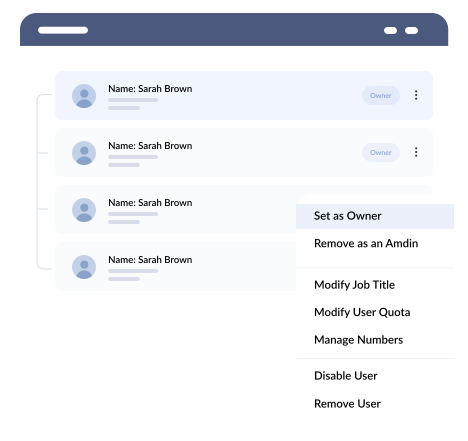
Business supports up to 5 team members and includes 1,000 pages per month. Manage members and fax numbers through the admin panel as responsibilities change.

Premium Features for Every Business

Ready for Teams of All Sizes
Effortlessly manage multiple fax numbers and team members with our advanced corporate admin panel. We ensure rigorous security and compliance for your peace of mind. Enjoy seamless integration with your software, high-volume faxing, and more.
Send & Receive Faxes in Your Email
Streamline faxing with our email-to-fax feature. Easily send faxes directly from your email and receive incoming faxes. Keep track of sent faxes and their status right in your mailbox.

Send Faxes with a Cover Sheet
Elevate your fax communication by sending cover pages along with your messages. Customize cover pages with your identity, subject line, or message details. Attach files from your computer, Google Drive, or Dropbox effortlessly.

Schedule Important Faxes
To be transmitted and delivered at precise times and dates in the future. Every sent fax generates a printable confirmation report with proof of delivery.


Security for your business documents
Fax.Plus protects stored faxes with AES 256-bit encryption and supports two-factor authentication for account access.
For workflows involving protected health information, use Enterprise with Advanced Security Controls and a signed Business Associate Agreement.


Connect faxing to your existing workflow
Use Fax.Plus with the tools your business already relies on, including Google, Microsoft, Slack, Zapier, and supported printers. Explore the available integrations to choose the connection that fits your workflow.


What experts say about us


FAQ
How quickly can I get set up?

Create your account and choose a plan to start using Fax.Plus. If you are transferring an existing fax number, porting typically takes 2–4 weeks. Keep your existing service active until the transfer is complete.
Can I send and receive a fax from my computer or mobile?
Yes. Use the Fax.Plus web or mobile app to send documents and view received faxes. Email-to-fax is also available, so you can send and receive faxes through your email account.
Is Fax.Plus secure?
Fax.Plus uses AES 256-bit encryption for stored faxes and supports two-factor authentication. Choose the account settings and plan that match the documents your business handles.
Can I keep my existing business fax number?
You can request a number eligibility check before purchasing a paid plan. In the United States, number porting requires Premium or a higher plan. Once your transfer is confirmed, you can use the number with Fax.Plus.
Can several employees use Fax.Plus?
Yes. Business supports up to 5 team members and includes an admin panel for managing members and fax numbers. Enterprise supports unlimited team members for larger teams.
Which plan suits a small business?
Start with how many people need access and the number of pages you expect to send and receive each month. An individual plan fits a single fax user. Business adds team administration; specialized security and compliance needs may call for Enterprise.
Does a small healthcare practice need Enterprise?
If you use Fax.Plus to handle protected health information under HIPAA, you need Enterprise, Advanced Security Controls enabled, and a signed Business Associate Agreement. This applies even when your practice has only one user.
How do I know whether my fax was delivered?
Check the fax status and confirmation report after sending. A successful delivery confirms reception by the destination fax machine or service; it does not confirm that a person has read or acted on the document.
More ways to fax for your business
Choose a business number, prepare your documents, or make faxing part of your everyday office routine.
Business numbers
Document formats
Office workflows
See how Fax.Plus fits your small business
Discuss your fax volume, team access, and number transfer with our team.
Schedule a demo to see the workflow that fits your business.


Confédération Suisse
Confederazione Svizzera
Confederaziun Svizra
Swiss Confederation
Innosuisse - Swiss Innovation Agency



