Connect incoming and outgoing faxes to a defined healthcare workflow, with AI-assisted extraction, human review and clear implementation responsibilities.


- Start with one document type and a clear destination for reviewed information.
- The Fax.Plus API can connect fax receipt and retrieval to a workflow your technical team builds.
- Fax.Plus AI can turn fax content into text and structured fields; eligible accounts can retrieve extracted data through the REST API.
- Review missing values and uncertain matches against the original fax before updating another system.
- Plan account requirements, permissions, exception handling and maintenance alongside the workflow.
A fax arrives with information your team needs in another system. Someone opens the document, finds the relevant details and enters them again. For repeated document types, healthcare fax automation can connect those steps so staff spend less effort moving information and more attention checking it.
The starting point is a practical question: what should happen after a particular fax arrives? That answer shapes the integration, the information it needs and the review that remains with your team.
Choose one fax workflow to connect
Pick a document type your staff recognize and a destination they already use. For example, an incoming administrative request might need a reference number extracted and a task opened for review.
Define which faxes belong in the workflow, what information the next team needs, and who reviews it before another record is updated.
This keeps the project focused on a useful handoff. If the immediate problem is deciding who handles each referral, start with a clear fax referral handoff. This article covers connecting the processing steps once that responsibility is defined.
Example: an imaging referral
A fictional request for an MRI of the right knee shows how missing information can interrupt an intake workflow. The date of birth is missing, so an authorized staff member must verify the information against the original fax before a downstream record is updated.
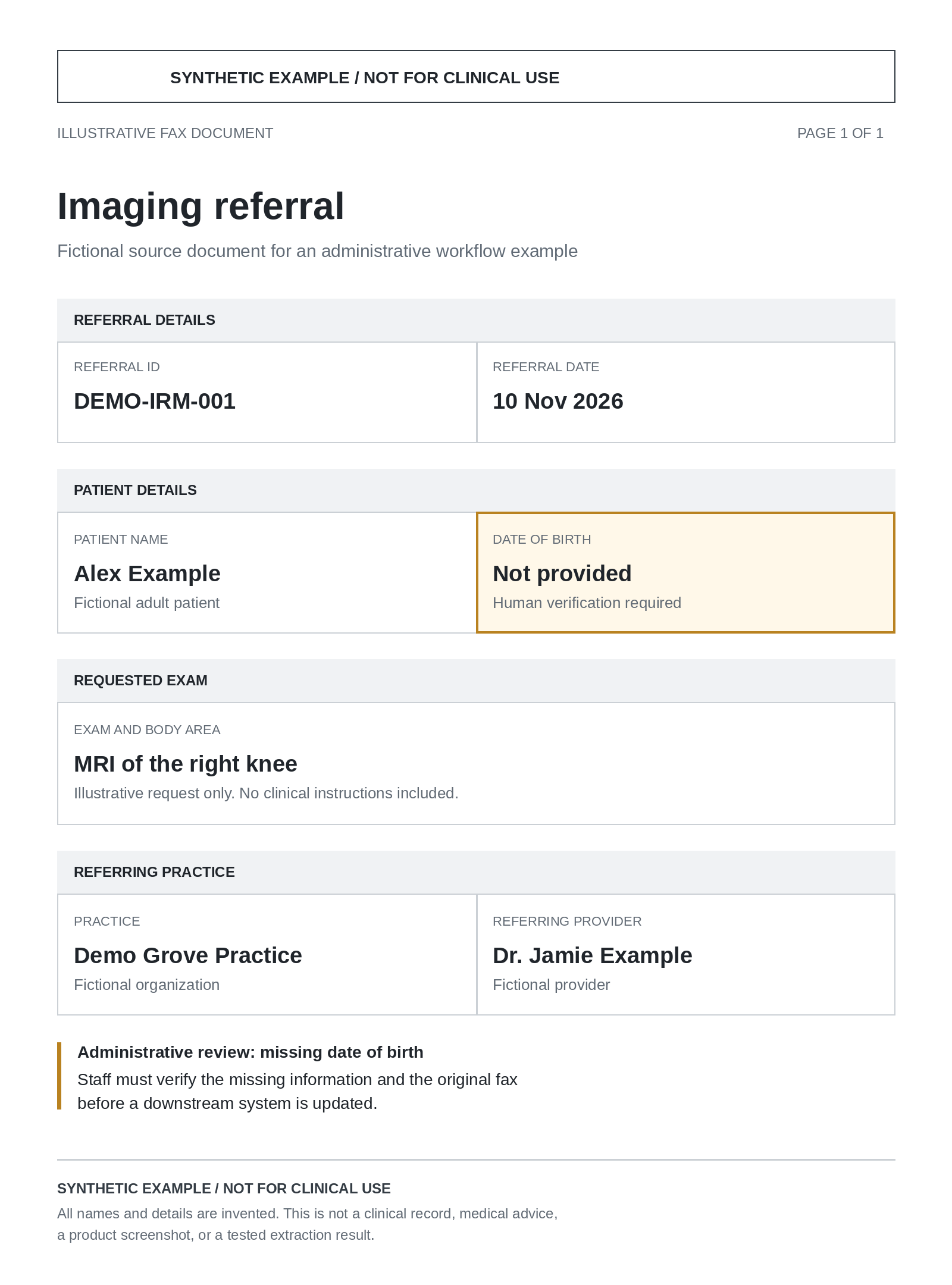
Synthetic referral shown for illustration. Staff must verify missing information and the original fax before a downstream system is updated. Not a product screenshot or a tested extraction result. Not for clinical use.
Receive the fax and retrieve the document
Fax.Plus webhooks can notify your application when an inbound fax finishes arriving. Your integration then retrieves the fax through the API and connects it to the workflow you have defined.
A dedicated receiving number can help identify the intended destination, but the document still needs to be checked before workflow-specific rules apply. A number used for one department is a routing cue, not proof of the document type or patient identity.
For an EHR destination, use the checklist for verifying document placement inside the EHR.
Your technical team builds the connection, including notification handling, document retrieval and recovery when a step needs another attempt. The HIPAA fax API provides the product starting point; the routing and updates in your own systems remain part of your implementation.
Extract useful information alongside the original fax
Fax.Plus AI offers AI Text Transcript for readable text and AI Data Extraction for structured fields. Custom fields help define the information your workflow expects.
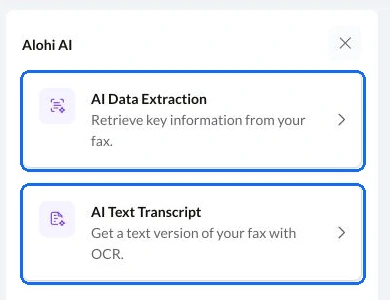
Extracted values appear alongside the fax and can be corrected without changing the original document. Optional automatic processing can prepare extraction results for newly received faxes. REST API retrieval of extracted data requires Enterprise, AI enabled and sufficient AI credits; the current documentation also supports retrieval on ASC-enabled healthcare accounts.
For current settings and usage rules, see the Fax.Plus AI feature documentation.
Review before updating another system
Build a review point where it matters: before an uncertain value or record match is used. Show the original fax and proposed information together so an authorized staff member can check them.
Use your organization's approved identifiers and matching rules. Route incomplete information or ambiguous matches to a review queue rather than assuming every fax can follow the same path. Clinical interpretation, acceptance and care decisions stay with the responsible professionals.
Once reviewed, your integration can pass the information to its destination through the connection your team has built. Keep a reference back to the source fax so staff can return to the document when a question arises.
Keep stalled work visible and recoverable
For each processing step, define the event that starts it, the evidence needed to finish it, and who handles a failure. In your workflow system, keep the source fax reference, current step, responsible team, next action and follow-up time together. A received fax can be ready for document review while the referral itself is still awaiting information.
Separate technical retries from administrative follow-up. If an application times out, check whether the earlier update completed before trying again, so recovery does not create a second task or duplicate record. If a page or identifier is missing, keep the item open for staff review and link the response to the original request. Set a review interval and backup owner for unresolved work under your organization's process.
These are controls to build in your integration or manage in the system your team uses for tasks. They do not imply native Fax.Plus task assignments, automatic patient matching or clinical triage.
Connect outbound faxing when the workflow needs it
Automation can also help when your application prepares a document for an external recipient. The API can submit the fax and provide a completion event containing its transmission status. Your integration checks that status and records the result against the relevant request.
Decide who handles unsuccessful sends and when staff should follow up. Transmission confirmation supports that process, but recipient review and acceptance remain separate steps. Apply any recipient-specific requirements before relying on fax for the handoff.
Evaluate referral intake with one practical scorecard
Before choosing a referral-management tool or building an API workflow, map a typical week: referral volume, arrival channels, locations, receiving numbers and the systems staff use next. Include unreadable pages, mixed-document packets and follow-up documents, not just clean referral forms.
Use the same examples to evaluate each option. For every check below, record the result as demonstrated, requires configuration, requires custom development or not supported. Name the team responsible for any remaining work.
- Intake and completeness: Can staff identify which pages belong to each referral and see what is missing? Ask how the proposed workflow handles a packet containing several patients and how a returned document is linked to the existing request.
- Administrative routing and clinical triage: Demonstrate how a reviewed referral reaches the intended location or specialty, including an unclear destination. Keep routing rules separate from clinical urgency and acceptance decisions, which need the organization's approved professional review.
- Review and exceptions: Show the original fax beside proposed fields. Test missing identifiers, conflicting values and an uncertain patient match. Include a fax that lists both a phone and a fax number, and check that the proposed fax number comes from the field labeled Fax, even when both numbers are read correctly. Verify that an unresolved item remains visible for authorized review rather than silently advancing.
- Progress and follow-up: Walk through received, awaiting information, under review and handed off. For each transition, identify the evidence needed, the responsible team and where the time and next action are recorded. Treat scheduling and the return of a specialist's report as separate milestones where relevant.
- Implementation boundaries: Ask which steps run in the fax service, which run in another application and which your developers must build. Verify access requirements, failure handling and the ability to resume work without creating a duplicate referral.
For Fax.Plus, the fax API and AI extraction described above are building blocks for that evaluation. The referral states, routing rules and downstream updates in this example are workflow requirements for your team to implement or manage in its chosen system, not a claim that Fax.Plus supplies a complete referral-management platform.
Agree on a baseline before the pilot: arrival-to-first-review time, incomplete-packet rate, unresolved exceptions and age of the oldest open item. Compare the same referral types and locations afterward. Keep fax transmission results separate from referral completion, so a successful send does not inflate the number of completed handoffs.
Run a patient-intake demo through an exception
Patient-facing forms and check-in cover a different step from processing documents that arrive by fax. For the fax portion, use approved synthetic or properly de-identified examples that represent your actual document types. Do not upload patient records to a demonstration environment without the required approval and safeguards.
- Start with an incomplete packet. Show which information is extracted, what staff must check against the source and how a missing item stays visible.
- Add a follow-up document. Demonstrate how an authorized reviewer connects it to the existing request and handles conflicting identifiers without assuming a patient match.
- Interrupt the downstream step. Test an unavailable destination, then show how the workflow resumes without duplicating the task or document. If an EHR is involved, verify the actual destination and review step, not just that a PDF reached an inbox.
- Hand the work to a colleague. Ask the covering reviewer to find the source, outstanding item and next action without relying on the original operator's memory.
Make the pilot measures reproducible
Define when each clock starts and stops before comparing results. Measure first review from completed fax receipt to the first authorized review, and time to handoff separately. Calculate incomplete-packet rate as packets needing additional information divided by all packets reviewed in the same period. Track unresolved items by reason and age, including the oldest open item, rather than reporting only an average. Record staff touches per packet and duplicate corrections alongside speed, so a faster workflow does not conceal extra rework.
Validate the complete workflow before expanding
Test with approved synthetic documents representing routine inputs, missing information and unclear matches. Check that staff can review exceptions and trace information back to the original fax.
For HIPAA workflows, confirm the Enterprise configuration, Advanced Security Controls and signed BAA. Review access, storage and logging across your own application too. Account safeguards and a tested implementation belong in the same plan.
Then measure the process you actually built: staff touches, exceptions and time to the reviewed next step. Use those observations to decide whether another document type is worth connecting.
Review Fax.Plus for a connected healthcare document workflow alongside the account and implementation requirements you have identified.
FAQs
Do we need developers for this fax automation workflow?

A custom API workflow requires technical work to connect fax events, documents and your systems. In-app AI tools can support document review without building that complete integration.
Can our system retrieve Fax.Plus extraction results?
Yes. REST API retrieval requires Enterprise, AI enabled and sufficient AI credits. Current documentation also supports it on accounts with Advanced Security Controls enabled for HIPAA workflows.
What should happen when extracted information is incomplete?
Send the item for authorized review against the original fax before updating another record. Your integration should preserve the source reference and record the next action.




Confédération Suisse
Confederazione Svizzera
Confederaziun Svizra
Swiss Confederation
Innosuisse - Swiss Innovation Agency