SRFax Review 2026: HIPAA, Pricing, and How It Compares
We tested SRFax: real pricing, HIPAA and BAA coverage, security claims, usability, data retention, and support. Scored across seven categories.


- SRFax is quietly part of the eFax family. Its Terms of Service name the operator as a division of Consensus Cloud Solutions Canada ULC, the parent of eFax, MyFax, SFax, and MetroFax, and parts of srfax.com are served from efax.com, yet the marketing pages never mention the connection.
- The cancellation and refund terms are the friendliest we have reviewed: cancel at any time, with pro-rated refunds for remaining full months, processed within 35 days.
- HIPAA plans include an easy BAA at every healthcare tier, but the public security materials reviewed did not include a SOC 2 report or ISO 27001 certificate for SRFax. Its HIPAA page still claims to be the only fax service that will sign a BAA, which is false.
- There is no SRFax mobile app, despite third-party directories claiming one exists; faxing runs through the web portal, email, a Windows print driver, and a Mac client.
- SRFax accounts and fax numbers are available in the United States and Canada only, with international sending offered at additional per-page rates. Best fit is North American healthcare practices that want low per-page HIPAA faxing and humane billing, and can live without a modern app.
Is SRFax Worth It in 2026?
SRFax is the rare service in this series where the fine print is friendlier than the marketing. The terms let you cancel at any time, promise pro-rated refunds for the full months you have not used, and commit to paying them out within 35 days. After reviewing services whose guarantees evaporate in the legal text, finding one that works the other way around is genuinely refreshing.
The product around those terms is solid but visibly aging. The platform runs on web, email, and a Windows print driver, with no mobile app and public security documentation that leaves key enterprise questions unanswered. One thing genuinely impressed us, though: fax quality. SRFax outputs at its platform's higher Fine resolution, and in testing the detail held level with Fax.Plus HD, sharper than a standard send, with only the gray Consensus background keeping it from a top mark. The compliance story is a signed BAA and self-described safeguards rather than audited certifications, which is workable for a small practice and a problem for enterprise procurement. And the company behind it is not the independent Canadian outfit the website suggests: since 2020, SRFax has belonged to the same parent as eFax, a fact the marketing pages leave out entirely.
For a solo practitioner or small clinic in the US or Canada faxing a steady monthly volume, SRFax is a reasonable, fairly priced choice. Teams that need audited certifications, mobile apps, international sending, or modern automation will find stronger options: Fax.Plus with a named auditor, apps on every platform, and HIPAA on Enterprise with Advanced Security Controls and a signed BAA, or Documo for a certification-heavy compliance file at a premium price.
If you are evaluating an alternative to SRFax, compare your actual monthly page volume, automation requirements and security review alongside the subscription price.
About SRFax
SRFax launched in 2004 in Nanaimo, British Columbia, as an independent Canadian internet fax provider, and built its name on exactly two things: HIPAA-friendly faxing for small healthcare practices and unusually decent customer treatment. Both are still the core of the product today.
The eFax Connection
What changed is who owns it. In February 2020, J2 Global, the then-parent of eFax, acquired SRFax's cloud services assets. When J2 spun off its fax business in 2021, SRFax landed in the new public company, Consensus Cloud Solutions (NASDAQ: CCSI), alongside eFax, MyFax, SFax, and MetroFax.
You will not learn this from srfax.com's marketing pages, which still read like an independent Canadian company. The disclosure sits in the legal text: the Terms of Service name the operator as SRFax, a division of Consensus Cloud Solutions Canada ULC, with a current notice address in Calgary, Alberta. The technical fingerprints agree: image assets on SRFax's own landing pages load from the eFax domain (efax.com).
Does the ownership matter? For day-to-day faxing, not much; the service has kept its own platform, plans, and support culture. It matters for context. When you compare SRFax against eFax, you are comparing two brands of one company, and the contrast is striking: the same parent runs the most complained-about cancellation flow in this series under one brand and the friendliest one under another. Buyers should also know that the long-term roadmap, billing infrastructure, and corporate policies sit with a Los Angeles-listed parent, not a Nanaimo startup.
What SRFax Offers
The core product is classic email and web faxing: a portal, email-to-fax and fax-to-email with up to 50 scheduled recipients, unlimited online storage (or none at all, if you switch on immediate deletion), a Windows print driver, a Mac client, and a documented fax API. Plans split into Standard and Healthcare lines, with the healthcare tiers carrying the HIPAA positioning and the BAA. Accounts and fax numbers are offered in the United States and Canada only; sending to international destinations works, at published per-page international rates.
How We Reviewed SRFax
We reviewed SRFax using four evidence layers:
- Hands-on product testing. We created an account and tested SRFax through the web portal, the email-to-fax workflow, and the Windows print driver. SRFax offers no mobile app, so on mobile we tested through the browser. We sent live faxes from each available surface to evaluate the full user experience.
- Fax-quality testing. We tested SRFax using two fixed, synthetic, real-world-style source documents: one government and legal document and one healthcare lab results form. The same source files were used across testing so we could evaluate output quality consistently. Across the tests, we assessed the practical details that matter in real document workflows, including readability, layout preservation, handwriting, fine print, stamps, signatures, barcodes, dense tables, and mixed font sizes. No real personal, medical, tax, company, or patient data was used in the fax-quality tests.
- Billing and account-control review. We monitored the billing flow from signup onward and mapped the cancellation path directly, comparing the marketed cancellation promise against the Terms of Service.
- Business-readiness review. We checked SRFax's public materials for security and compliance claims, including its HIPAA, PHIPA, and security overview pages and Terms of Service, plus data retention options, API and developer resources, and corporate ownership. Pricing, plan limits, policy wording, and the Consensus ownership disclosure were verified by live page retrieval in June 2026.
We then scored SRFax across seven areas: fax quality, pricing, security and compliance, usability, customer service and account control, data residency and retention, and enterprise, API, and healthcare automation.
1. Fax Quality | Score: 4/5
SRFax sends very good faxes, and this was the surprise of the test. SRFax runs on the Consensus platform, the same engine behind eFax and MyFax, and its output sits at that platform's Fine resolution, the higher of the two quality modes the siblings expose. On pure detail it is one of the strongest outputs we have seen in this series: sharper than Fax.Plus Standard, and level with Fax.Plus HD on fine print, signatures, and stamp edges. The one thing holding it back is the gray background that the Consensus platform stamps on every page. Strip that away and the legibility is excellent.
Here is the catch worth knowing before you sign up. SRFax gives you no quality setting at all. There is no Standard or Fine toggle, no resolution dropdown, nothing. You get one fixed output level. The pleasant surprise is that the one level you get is the high one.
Test Methodology
We tested two document types in both directions (Fax.Plus to SRFax and SRFax to Fax.Plus) and ran multiple passes. Since SRFax has no quality selector to compare against itself, we lined its single output up against Fax.Plus Standard and Fax.Plus HD on the same files, plus the MyFax Fine results from our earlier test so we could place SRFax on the same scale as its platform siblings. The two source files were a simulated IRS Form 2553 and a simulated healthcare lab results form, the fixed synthetic documents we use across this whole series. No real personal, medical, tax, or patient data was used.
Government and Legal Document Test
The first test used a simulated IRS Form 2553, a US government tax election form. Documents like this show up constantly in legal, financial, and real estate work: signed agreements, tax filings, and multi-party authorization forms where one smudged digit can cost you.
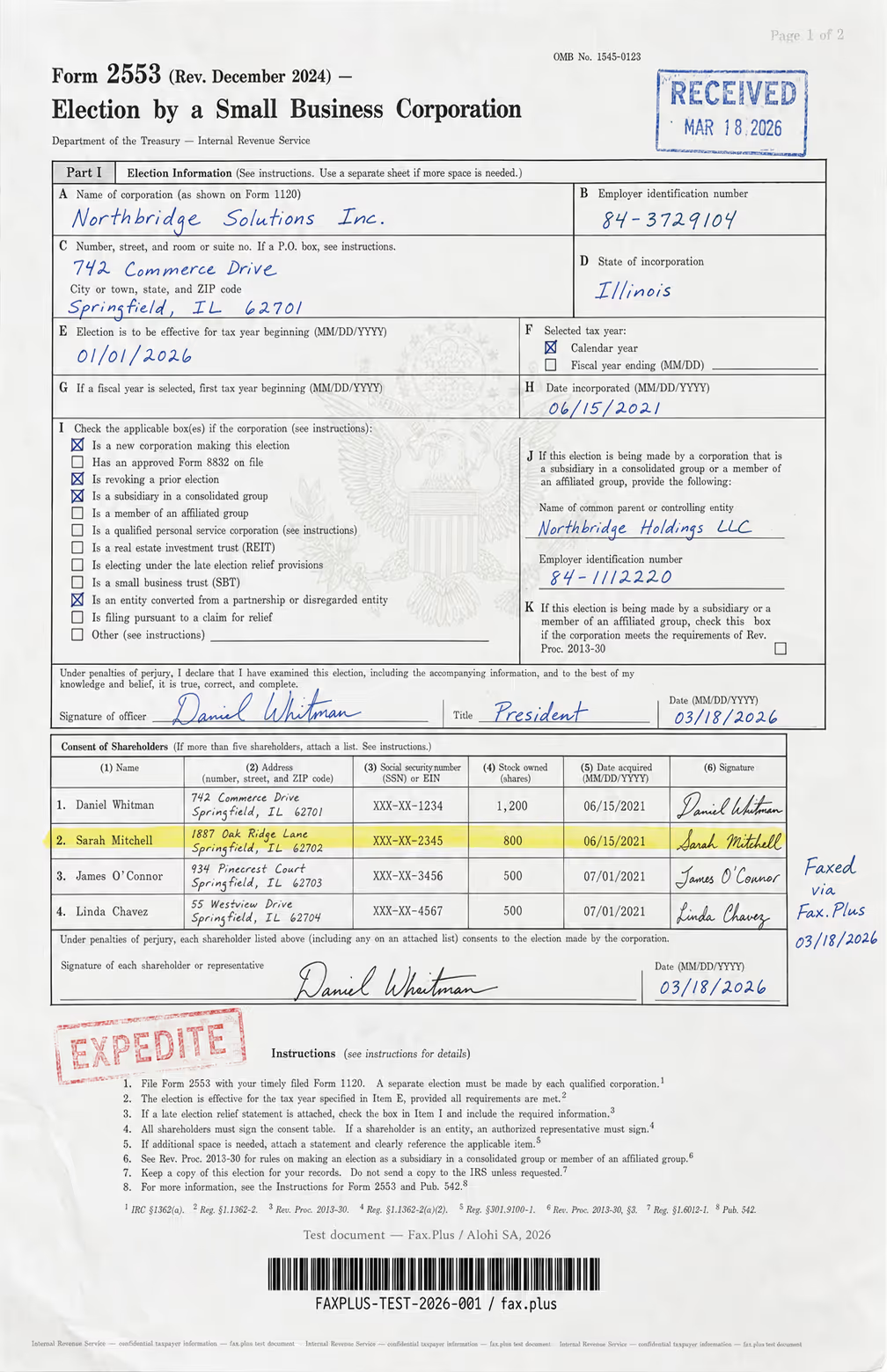
What the test document included:
- Handwritten signatures and a cursive officer name
- An official-style RECEIVED stamp with a date
- An EXPEDITE rubber stamp with faded ink edges
- A US government eagle seal watermark in the center
- A highlighted shareholder table row
- Mixed font sizes across headers, body text, and fine print
- Dense tabular data across multiple columns
- A microprint line at the bottom, the tiny anti-fraud text you find on official forms
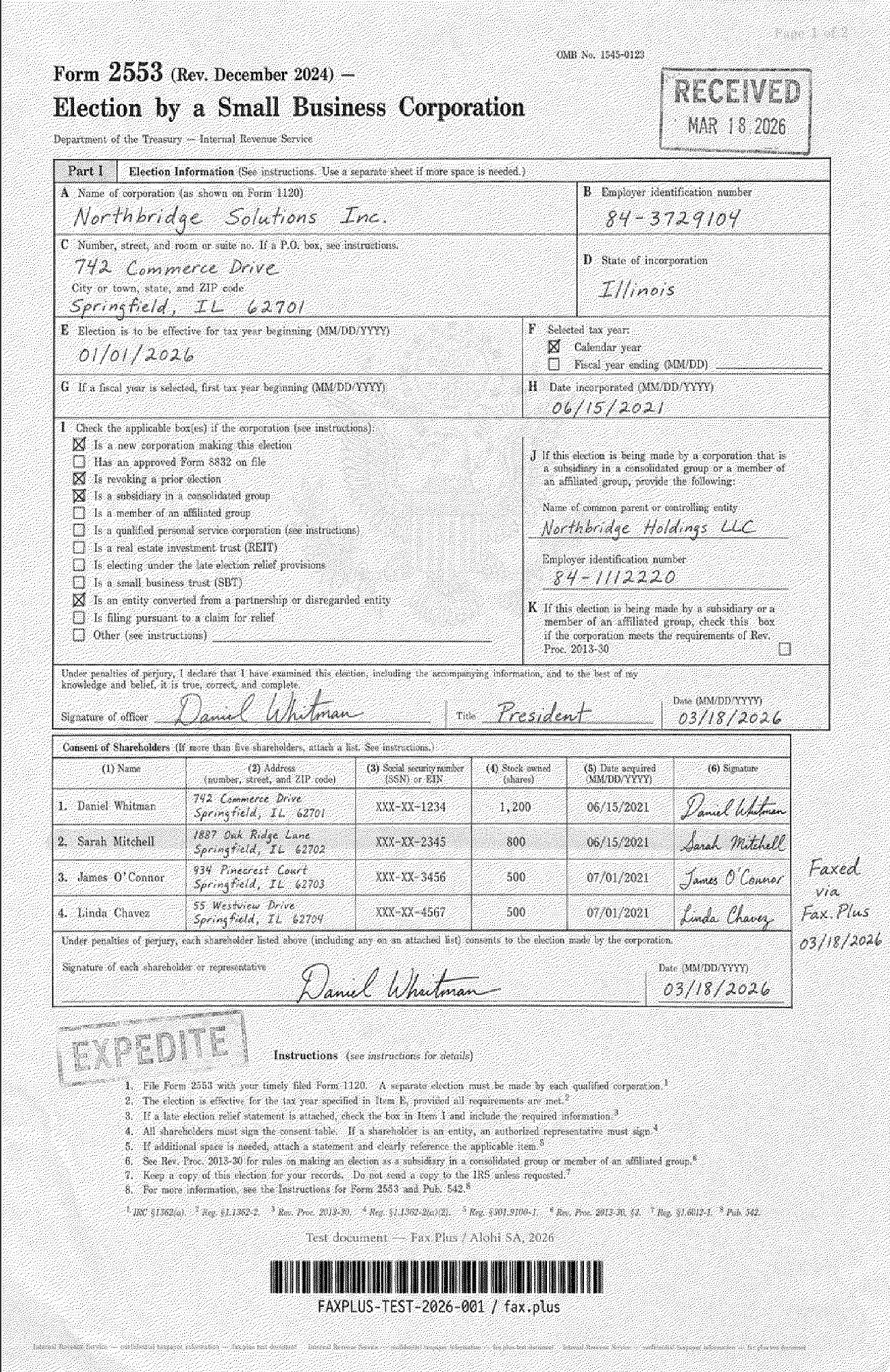
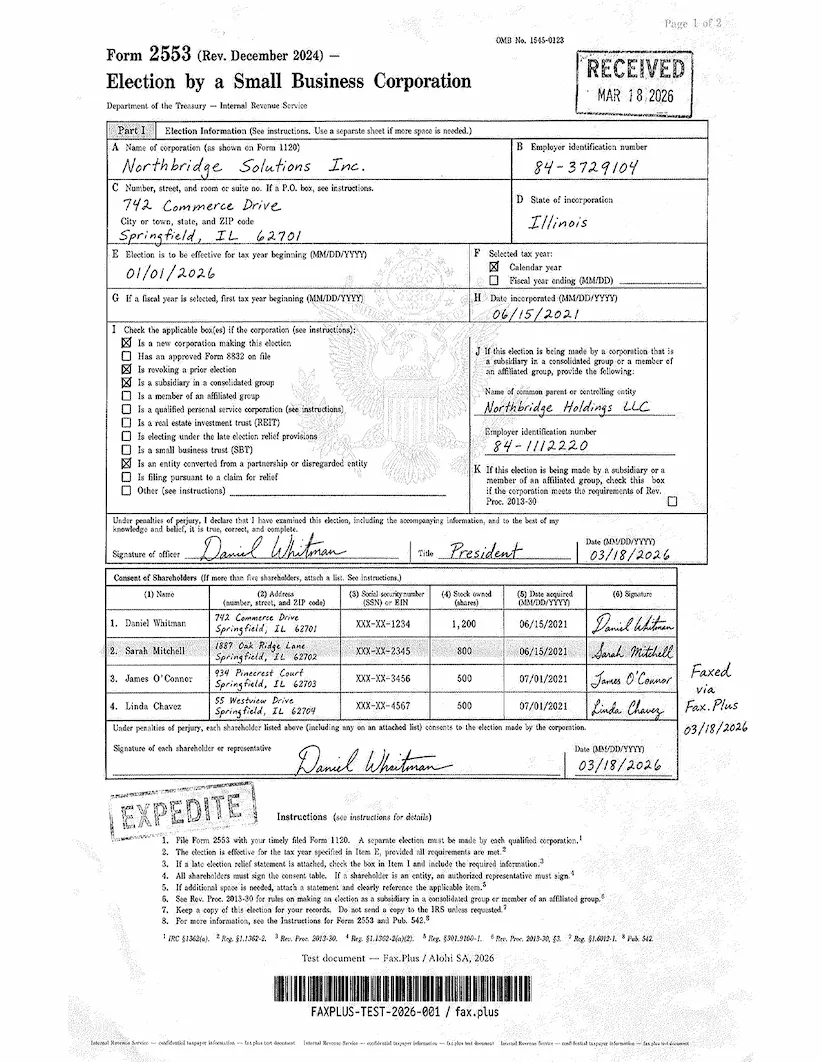
The form arrived clean on the first pass. The handwritten signatures and the cursive officer name stayed readable, the RECEIVED and EXPEDITE stamps survived, and the dense shareholder table kept its columns. SRFax carries the Consensus fingerprint here, a gray texture laid across the whole page. This is called dithering, a pattern of tiny dots fax engines use to approximate shading, and it leaves the page looking off-white instead of clean white. Detail aside from that background was strong, the Treasury eagle watermark held, and the microprint line came through. The two comparisons below place SRFax against Fax.Plus on the same form. SRFax has no resolution control, so these are not a settings test inside SRFax; they show where its single fixed output lands against a normal-resolution send and a higher-resolution reference.
SRFax vs Fax.Plus Standard Resolution
Fax.Plus Standard is the normal-resolution baseline, and on this form SRFax edges ahead of it on detail. Both keep the shareholder table columns clean, the signatures readable, and the RECEIVED and EXPEDITE stamps intact, but SRFax holds the microprint line and the faint eagle watermark a touch more crisply than a standard send does. The one place Standard wins is the background: Fax.Plus Standard is clean white, while SRFax carries the gray Consensus texture. So the trade on the IRS form is detail versus cleanliness, and on a document that gets photocopied or re-faxed down the line, the clean white original holds up better through each generation even when its first-pass detail is slightly softer.
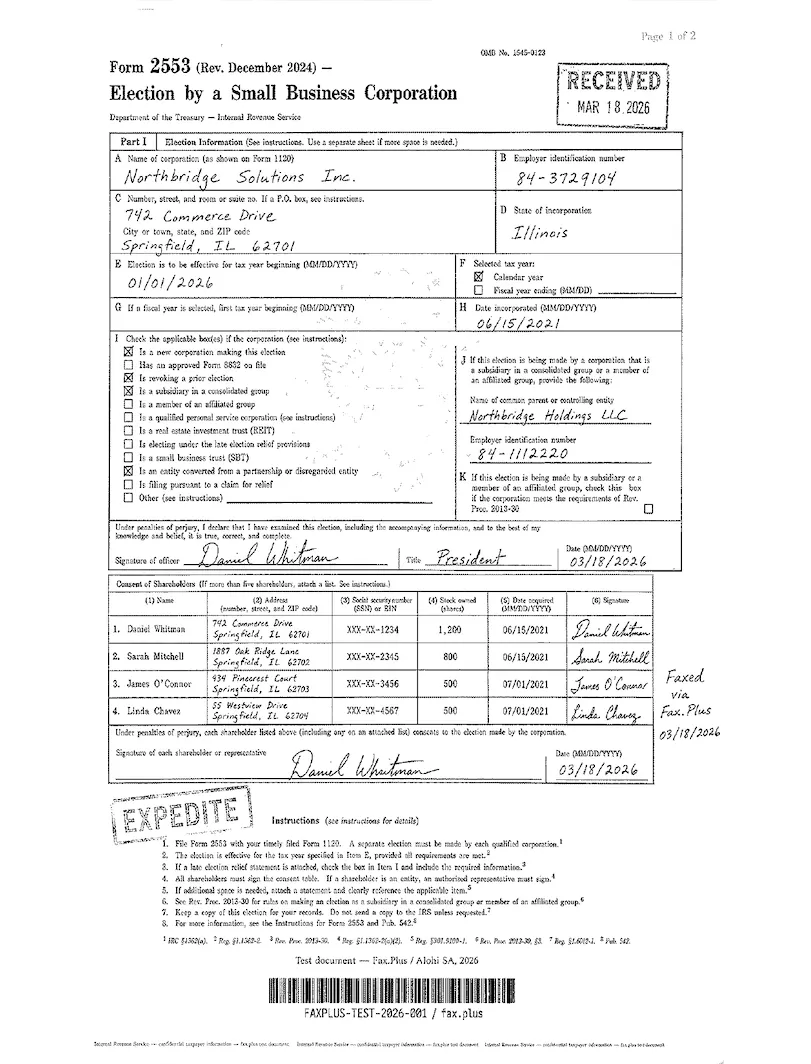 Standard
SRFax vs Fax.Plus HD Resolution
Fax.Plus HD is the top reference. On this form, SRFax keeps up on detail: the microprint line, the smallest body text, the dense table rules, and the faint stamp and watermark edges that usually separate HD from a standard send all survive on SRFax at close to HD level. The single consistent difference is again the background. HD renders the form on clean white; SRFax lays the gray dithering over it. Take the background out of the picture and the two are genuinely close on legibility, which is rare to say against Fax.Plus HD. The practical read on the IRS form: SRFax gives you HD-class detail with a gray cast you cannot remove, HD gives you the same detail on a clean page, in 2 to 3 minutes against SRFax's 1 to 2.
 HD
Healthcare Document Test
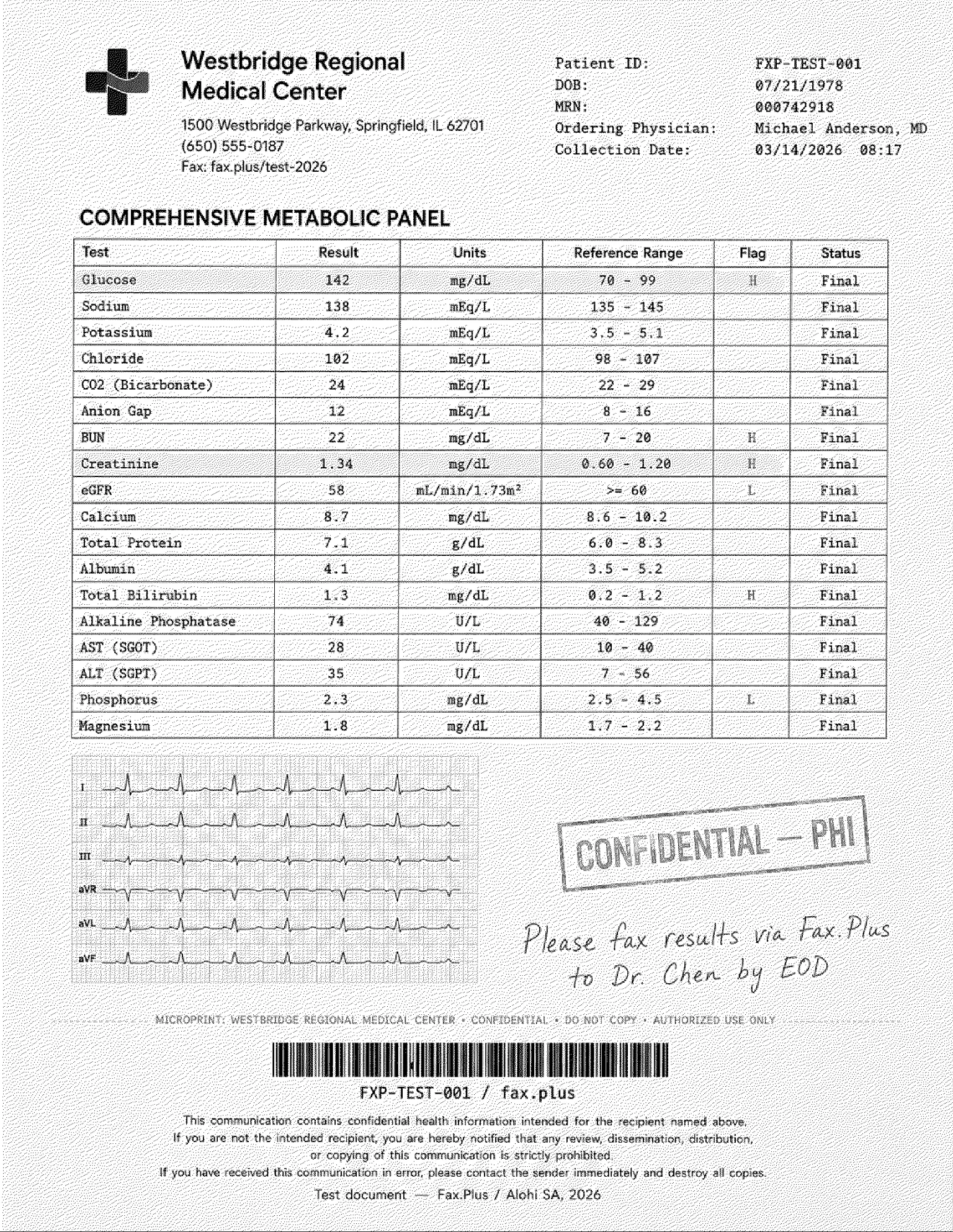
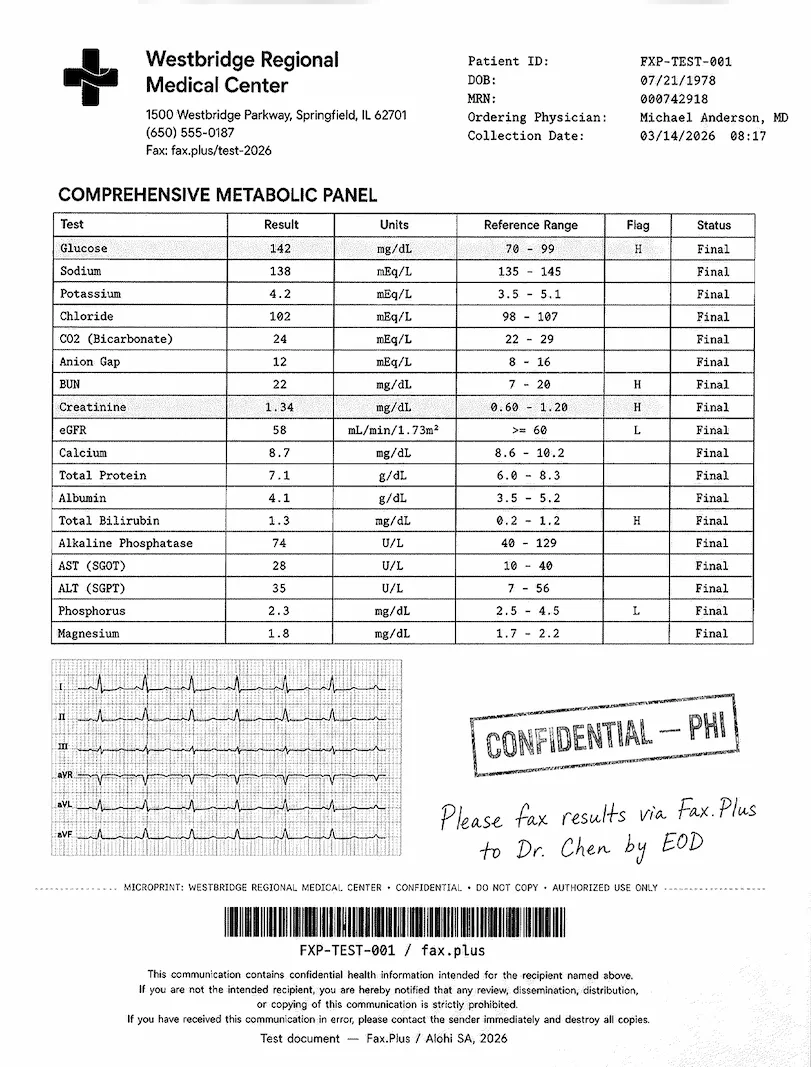
The second test used a simulated lab results form from a fictional medical center. No real patient data was used. The EKG strip printed on red grid paper is in there as a deliberate stress test, the hardest thing you can ask a black-and-white fax to carry. The rest of the page is ordinary healthcare traffic: lab values, flag markers, a handwritten physician note, and a stamp marking protected health information, which is patient data the law treats as confidential.
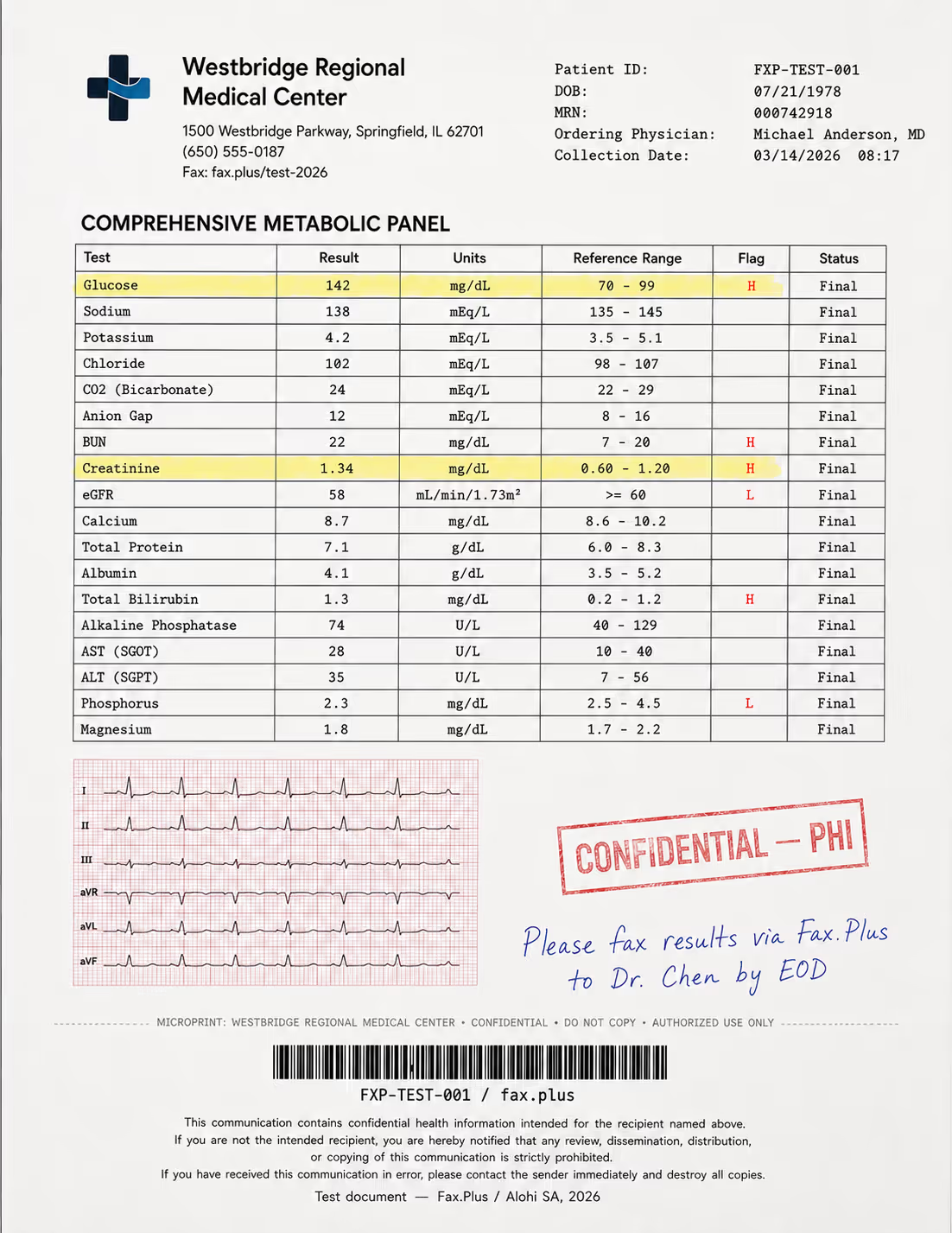
What the test document included:
- A comprehensive metabolic panel with highlighted flag values (the H and L markers next to out-of-range results)
- A 6-lead EKG strip on red grid paper, the quality stress test
- A handwritten physician instruction in blue ink
- A CONFIDENTIAL/PHI rubber stamp with faded edges
- Patient header data and a Code-128 barcode
- A HIPAA disclaimer footer in small print
- A microprint anti-fraud line
The result tracked the government test, which is what you expect when one engine renders both pages. The lab values, the H and L flag markers, the handwritten note, the PHI stamp, and the small HIPAA footer all came through sharp. The EKG trace stayed clear and the fine grid behind it held up well. The red color of the grid did not survive, which is expected: fax sends in black and white only, so any color drops to gray no matter which service you use. The gray Consensus background sits behind all of it, the one persistent knock on an otherwise clean result.
One workflow note that matters for clinics, and is not about pixels. SRFax delivers a received fax as a single file once the whole transmission lands, so a long referral packet or a multi-page lab result arrives all at once, at the end. Fax.Plus offers Fax Streaming on its healthcare tier, which releases each page the moment it is decoded rather than holding the document until the last page arrives, so staff can start reading page one of a referral while the rest is still coming in. For a busy practice handling time-sensitive results, that page-by-page delivery shortens the wait on long inbound faxes. SRFax has no equivalent. The same gap shows up in inbound routing: SRFax notifies an authorized email address (and can PGP-encrypt that notification), while Fax.Plus adds HIPAA-compliant email-to-fax through a TLS-enforced address, with a signed BAA on Enterprise, so the email path itself is covered by the compliance agreement rather than sitting beside it.
SRFax vs Fax.Plus Standard Resolution
On the lab form, SRFax again reads a step sharper than Fax.Plus Standard. The metabolic panel values and the H and L flags are clean on both, but SRFax resolves the small HIPAA footer text and the barcode lines slightly better than a standard send. Standard's advantage is the clean white background, which matters more on a clinical document that may be scanned into an EHR, where a gray cast can muddy a later re-scan. Detail to SRFax, cleanliness to Standard.
 Standard
SRFax vs Fax.Plus HD Resolution
Against HD on the lab form, the story holds: SRFax matches it on the detail that counts. The flag markers, the handwritten physician note, the PHI stamp edges, the barcode, and the EKG grid all survive on SRFax at close to HD sharpness. HD pulls slightly ahead on the very finest EKG deflections and renders the whole thing on clean white, where SRFax keeps the gray ground. For a lab result that has to stay legible through a clinic's own re-scanning and archiving, HD's clean page is the safer original; for a one-time read, SRFax's output is effectively as detailed.
 HD
SRFax
Send Speed
Send speed was solid, and notable given the detail SRFax preserves. It completed single-page sends in about 1 to 2 minutes across both tests. Fax.Plus Standard usually finishes in about a minute, and Fax.Plus HD takes roughly 2 to 3 minutes because it preserves more detail. SRFax lands in between: it delivers close to HD-level detail in standard-send time, without the 2-to-3-minute HD wait. That is a real efficiency, and one of the few places where the fixed-output approach works in the user's favor.
Send time is only one side of speed. On inbound, Fax.Plus also offers real-time fax streaming, which delivers each page of an incoming fax the moment it is decoded instead of holding the whole document until the final page lands, useful when a multi-page record is time-critical. Most cloud fax services deliver the document only after every page has arrived.
How SRFax Fax Quality Compares
The short version: SRFax gives you one output level, you cannot change it, and it is a high one. It runs at the Consensus Fine resolution (the same higher mode eFax and MyFax expose), which on detail puts it above Fax.Plus Standard and level with Fax.Plus HD on fine print, signatures, stamps, and watermarks. The only thing standing between SRFax and a top mark is the gray dithering baked into every Consensus page; on a clean white background this output would be among the best in the series. Read against the MyFax and eFax Standard defaults, with their heavier gray wash, SRFax is clearly the better-looking sibling.
| Category | SRFax | MyFax Fine | Fax.Plus Standard | Fax.Plus HD |
|---|---|---|---|---|
| Background | Gray dithering | Gray, not fully white | Clean white | Clean white |
| Fine print / detail | Excellent | Excellent | Good | Excellent |
| Government form (IRS 2553) | Sharp | Sharp | Clean | Sharp |
| Healthcare lab results | Sharp | Sharp | Clean | Sharp |
| EKG strip (stress test) | Trace and grid held | Trace and grid held | Grid and trace retained | Finer detail retained |
| Watermark / seal | Held, on gray ground | Held, on gray ground | Partially retained | Full detail, clean ground |
| Send time | 1-2 min | ~4 min | ~1 min | 2-3 min |
| Quality control | None (Fine-equivalent) | Standard / Fine toggle | Standard / HD toggle | Standard / HD toggle |
The 4/5 reflects output that matches Fax.Plus HD on detail and beats Fax.Plus Standard, delivered in standard-send time. It loses a point for two things you cannot change: the gray background the Consensus platform applies to every page, and the absence of any quality control at all, no toggle to adjust, no clean-white option, just the one fixed output. Excellent as that output is, a service that locks you into a single look with a permanent gray cast is one config decision short of perfect.
2. Pricing | Score: 4/5
SRFax prices like what it is: a volume-oriented service for steady faxers, split into Standard plans for general business and Healthcare plans that carry the HIPAA positioning.
The Plans
Compare the Healthcare plans below for a like-for-like HIPAA and BAA decision. Prices are in US dollars; each monthly allowance combines sent and received pages. The annual figures are monthly equivalents billed annually, not the month-to-month subscription price. If you have an existing Standard or EMR-specific plan, use the currency and terms on your current invoice when comparing costs.
The healthcare line is the one most buyers come for, and the tiers scale by combined sent-and-received pages:
- Healthcare Lite: $12.60 per month, or $10.70 per month billed annually. 200 pages. Overages at $0.05 per page.
- Healthcare Basic: $16.05 per month, or $13.65 annually. 500 pages. Overages at $0.05.
- Healthcare Basic Plus: $22.95 per month, or $19.50 annually. 800 pages. Overages at $0.05.
- Healthcare Standard: $41.35 per month, or $35.15 annually. 1,500 pages. Overages at $0.05.
- Healthcare Standard Plus: $68.95 per month, or $58.60 annually. 2,500 pages. Overages at $0.05.
- Healthcare Professional: $137.90 per month, or $117.20 annually. 5,000 pages. Overages at $0.05.
- Healthcare Professional Plus: $275.75 per month, or $234.35 annually. 10,000 pages. Overages at $0.045.
- Healthcare Professional Premium: $551.55 per month, or $468.80 annually. 20,000 pages. Overages at $0.04.
Healthcare plans offer additional fax numbers at $4.95 each, multiple individual user accounts, unlimited authorized email addresses and consolidated billing. The public Healthcare pricing page does not advertise a free trial. Porting a local number into SRFax carries a $25 one-time fee, and international sending is charged at published per-page destination rates. Compare your actual invoice if an EMR-specific offer or negotiated plan applies. For occasional general-use sends, an online free fax service may fit better than a recurring plan.
SRFax Healthcare Lite starts at $12.60 per month for 200 pages. Healthcare Basic Plus works out to roughly 2.9 cents per included page, while extra pages cost $0.04 to $0.05 depending on the selected Healthcare tier. Included-page costs and overage charges are different comparisons: for example, Fax.Plus Enterprise lists extra pages at $0.03. Compare the total for the volume you actually use.
One small irritation sits in the flow: OCR as a paid add-on feels stingy at this price level.
The entry prices below use each provider's advertised billing basis. Fax.Plus Basic's $6.99 monthly equivalent is billed annually; for HIPAA with a signed BAA, compare Enterprise rather than Basic. The matched monthly-billing examples follow below.
| Service | Entry Price | Pages/month | Free Option | HIPAA + BAA |
|---|---|---|---|---|
| SRFax Healthcare Lite | $12.60/mo | 200 | No | BAA on healthcare plans, on request |
| Fax.Plus Basic | $6.99/mo | 200 | Yes (10 pages, one-time) | From Enterprise |
| iFax Basic | $12.49/mo | 200 | No | BAA from Plus |
| eFax Personal | $18.99/mo | 200 | No | BAA on Business+ |
| Documo Solo | $25/mo (annual only) | 300 | No | BAA on all plans, on request |
Against the field, SRFax sits in a sensible middle. It undercuts its own sibling eFax by a wide margin at the entry level, beats Documo's $300 annual-only commitment for a healthcare starter, and lands close to iFax while including a BAA path iFax gates higher. Fax.Plus Basic at $6.99 per month billed annually covers 200 pages for general use; healthcare teams should compare Fax.Plus Enterprise, with HIPAA through Advanced Security Controls and a signed BAA, unlimited members and 4,000 combined pages at $99.99 monthly or $79.99 per month billed annually. For a team moving beyond basic faxing, include overage, administration and the receiving setup in the total cost.
SRFax vs. Fax.Plus: monthly cost examples
At the selected volumes below, Fax.Plus Enterprise costs less than the relevant general SRFax Healthcare plan. Both examples use monthly billing in USD, combined sent and received pages, and plans supporting a signed BAA. HIPAA use on Fax.Plus requires Enterprise with Advanced Security Controls and the signed BAA.
| Monthly pages | SRFax Healthcare | Fax.Plus Enterprise | Monthly saving |
|---|---|---|---|
| 4,000 | $137.90 (5,000-page plan) | $99.99 | $37.91 with Fax.Plus |
| 5,000 | $137.90 | $129.99 (including 1,000 extra pages) | $7.91 with Fax.Plus |
Selected cost examples, checked November 23, 2026. Fax.Plus uses the public 4,000-page Enterprise allowance and $0.03 per extra page. General SRFax Healthcare pricing is shown; EMR-specific offers, negotiated rates, destinations and your actual account setup can change the comparison.
Enterprise includes unlimited members. When several members share a receiving number, each assigned member's incoming copy counts toward the page allowance, so include your receiving assignments when estimating usage. For larger volumes, ask for a quote that matches your pages, numbers and workflows.
The 4/5 reflects transparent plan pricing and honest billing, held back a notch by the missing advertised free trial, the paid OCR add-on and the local-number porting fee. Value depends on the page volume and plan being compared.
Compare your monthly fax costs
Share your monthly pages, fax numbers and team setup to discuss the right Fax.Plus plan.
Get a quote for your fax volume3. Security and Compliance | Score: 3/5
SRFax's compliance story was written for a different era of this market, and it shows, both in what it promises and in what it never got around to adding.
What SRFax Claims
The HIPAA page describes the safeguards you would expect: SSL-encrypted sessions, application-level separation between customer accounts, restricted employee access, firewalled and monitored infrastructure, redundant storage with nightly off-site backups, and 2048-bit SSL certificates. Two genuinely good options sit on top: customers can upload a PGP public key (PGP is end-to-end email encryption, meaning the fax notification is locked before it leaves SRFax and only your email software can open it), and a "No Storage" setting deletes fax data the moment it is delivered.
A BAA is available, and this is worth saying plainly because it decides healthcare usability: a Business Associate Agreement is the contract HIPAA requires between a healthcare organization and any vendor that touches patient health information. Without one, faxing patient documents puts the practice itself out of compliance. SRFax signs BAAs across its healthcare plans on request: the healthcare pricing page carries a "Request a BAA" link that routes to the contact form rather than offering a downloadable template or a self-serve signing flow, so the agreement is arranged by email or phone. Small-practice reviewers consistently describe that process as quick. One structural note worth flagging: SRFax's General Terms of Service, the master customer agreement, make no mention of HIPAA or the BAA at all, so the BAA stands as a separate document obtained on request rather than anything referenced in the contract you accept at signup, and that master agreement caps SRFax's total liability at the amount you actually paid for the service, a low ceiling measured against the potential cost of a PHI exposure.
What Is Missing
Now read the same pages the way a compliance officer would. A SOC 2 report and an ISO 27001 certificate provide different forms of independent assurance about an organization's controls. In the SRFax security materials we reviewed, we did not find a public SOC 2 report, ISO 27001 certificate or named auditor for the SRFax service. Its security overview does describe third-party penetration testing; that is useful evidence, but it is not the same as an assurance report covering a defined control framework.
Because these acronyms come up across every review in this series, here is what each one actually tells a buyer, in plain terms:
The Certifications, in Plain Language
- SOC 2 Type II: an auditor did not just take a snapshot but watched the company's security controls work over a period of months, then reported on whether they held up.
- ISO 27001: an international standard saying the company runs security properly as an organization, who can access what, how risks are tracked, what happens when something goes wrong.
- HITRUST: a healthcare-focused certification that bundles HIPAA, ISO 27001, and other rules into one standard an outside assessor can certify against. It is the credential large hospital systems most often ask their vendors to prove.
- PCI DSS: the standard that says card payments are handled safely.
The absence of a public report does not make the service unsafe. It means a buyer who needs independent assurance for procurement should request the applicable report, scope and auditor details rather than infer them from a general security statement.
Then there is the page itself. SRFax's HIPAA page describes it as the only HIPAA-compliant healthcare fax service that will sign a Business Associate Agreement. That claim is false: its sibling brand eFax signs BAAs, as do Documo, Fax.Plus and others in this series. The page also says SRFax “may be defined as” a Business Associate rather than clearly stating that role. Neither point invalidates its BAA, but the public compliance wording needs more precision.
There is an irony here too. SRFax's parent, Consensus, operates HITRUST-certified infrastructure for its eFax Corporate product. Whatever certifications exist at the corporate level, SRFax's own pages claim none of them, so a buyer evaluating SRFax on its public materials gets the weakest documented compliance posture of any healthcare-focused service in this series.
One bright spot for Canadian buyers sits alongside the HIPAA material: SRFax maintains a dedicated PHIPA compliance page. PHIPA is Ontario's Personal Health Information Protection Act, the provincial equivalent of HIPAA for handling patient health information. On it, SRFax commits to storing all data in Vancouver, British Columbia, and keeping it within Canadian borders, a residency promise most US-focused rivals never make. The honest caveat is the same one that applies to the rest of the file: this is a published policy commitment, not an independently audited certification. For a Canadian practice it is a real and relevant commitment; it is just a stated policy rather than a certified one.
How SRFax Security Compares
The gradient across the field is clear. Documo publishes a trust center listing HITRUST, ISO 27001, SOC 2 Type II, and PCI DSS. eFax runs a HITRUST-certified platform. Fax.Plus has an ISO/IEC 27001 certification and a SOC 2 Type 2 report at the organization level, with EY CertifyPoint identified in its compliance documentation, plus CSA STAR, PCI DSS adherence, GDPR and CCPA compliance, and HIPAA with a signed BAA on its Enterprise plan. Even iFax, whose tier-gated security page we criticized, at least names the frameworks. SRFax offers a real BAA, real safeguards, and two privacy features (PGP notifications and instant delete-on-delivery No Storage) that few rivals match as simple account toggles, wrapped in documentation that has not kept pace.
The 3/5 reflects exactly that split: a genuinely usable HIPAA path for small practices, marked down for missing public audit-report evidence and imprecise compliance claims.
Make security part of your comparison
Explore Alohi's security standards and compliance documentation for Fax.Plus.
Explore our security and compliance4. Usability | Score: 3/5
SRFax is easy to use and visibly dated, in about equal measure. Both are true at once, and for most people the first one matters more day to day. You can learn the whole product in an afternoon. You will also notice, every time you log in, that nobody has redesigned it in years.
The Interface
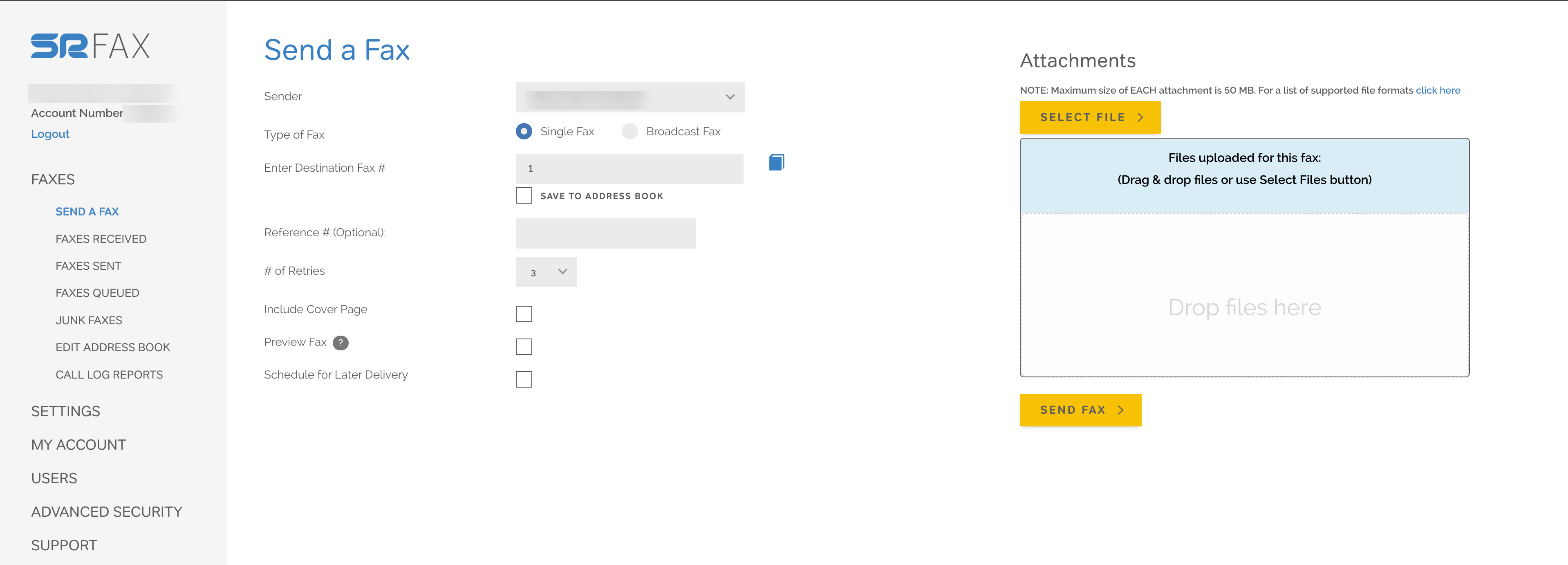
The web portal uses one consistent look on every screen: blue table headers in all caps, yellow buttons everywhere, and a left-side menu covering Faxes, Settings, My Account, Users, Advanced Security, and Support. The layout is logical and everything is one or two clicks away. The Send a Fax screen keeps the form on the left (sender, fax type, destination, retries, cover page, scheduling) and the file upload panel on the right, so the workflow reads clearly the first time you see it.
The style is pure Consensus family. That same blue-header, yellow-button, gray-background look runs across eFax and MyFax too, and it reads like enterprise software from the early 2010s. It is not broken or confusing, just clearly in maintenance mode. No real refresh has landed in years, the checkboxes use the plain browser default with no styling, and the footer still shows what looks like the old Twitter bird. None of this stops a fax from sending. It just tells you where the company spends its effort, which is on the fax engine, not the screen around it.
Sending a Fax
The send flow is clean and quick. Enter the destination, upload your file by dragging it in or browsing, set an optional schedule for up to 50 recipients at once, and hit Send. SRFax also installs a print driver on Windows, which lets you fax straight from any program's Print menu without opening a browser, and a Mac client that handles local archiving. Email-to-fax works from any address you authorize in settings, which is how most desk-based offices fax without a machine in the room. Reviewers across Capterra and TechRadar consistently describe the experience as easy to set up and unexciting to use, which for a fax tool is mostly a compliment.
Nothing here needs a support ticket to figure out. The learning curve is genuinely flat.
No Mobile App, and Directories That Say Otherwise
This is where it shows its age. There is no SRFax app for iPhone or Android, so the phone experience is the website loaded in a mobile browser, and it was not built for a small screen. The left menu stays put instead of folding into a hamburger menu, so it eats horizontal space the content needs. Table-heavy screens like Faxes Received spill off the right edge, and the Actions column, the one with download and delete, is the first thing to disappear, so basic tasks mean scrolling sideways to find the buttons. On the Send a Fax screen the form and upload panel stay side by side instead of stacking, which squeezes the destination number field down to roughly 130 pixels wide.
The missing app is not an oversight but a long-settled decision. In SRFax's own support forum, customers requested iPhone and Android apps years ago, staff replied that an app was planned, it never shipped, and the company eventually apologized and recommended a third-party scanning app plus email-to-fax as the workaround. Meanwhile SRFax's own FAQ markets the browser experience with "When you think Fax Mobile, think SRFax," and third-party software directories actively get it wrong: SourceForge, for one, states SRFax "has a mobile app for iPhone and iPad." It does not. This is the same directory-misinformation pattern we documented with Documo's nonexistent Android app, and it matters for the same reason: people pick fax services off these listings.
To be fair, none of this breaks on mobile. You can send and receive from a phone in a pinch. But it is not adapted for one, and for something like a clinic where someone checks an incoming fax between rooms, that gap is felt more than it would be at a desk.
How SRFax Usability Compares
For browser-and-email teams, SRFax is perfectly serviceable, and the print driver covers the office workflow that Dropbox Fax handles with less depth. The moment phones enter the picture, the field pulls ahead: iFax ships capable apps on both platforms, ComFax is mobile-first by design, Documo at least has an iOS app, and even eFax covers both stores with mixed-review apps. Fax.Plus covers every surface at once: native iOS and Android apps rated 4.7/5 and 4.5/5, desktop apps for macOS and Windows, web, and email-to-fax, with camera capture built in. The 3/5 reflects dependable desktop workflows and a generous scheduling feature, held back by the missing mobile story and a platform that is visibly running on maintenance mode.
5. Customer Service, Cancellation and Account Control | Score: 5/5
This is SRFax's best category, and the most interesting one, because of who owns it.
The Terms Actually Favor the Customer
Start with the contract, since this series has taught us that is where promises go to die. SRFax's terms say the opposite of what we have come to expect: either party may terminate at any time, refunds are pro-rated for any remaining full months based on the cancellation date, and refunds are processed within 35 days. The marketing promise of "no-hassle cancellation, no questions asked" is the rare one that the legal text actually backs up. After documenting CocoFax's 24-hour window dressed as a 30-day guarantee, reading a refund clause this clean was almost disorienting.
Support Reputation
The support record matches. Across Capterra and SRFax's own review stream, users praise fast phone and email responses, smooth onboarding, painless BAA issuance, and in several cases name individual support staff, which almost never happens in this category. The pattern holds across years of reviews, from solo therapists to pharmacies. We found no recent cluster of billing or support complaints of the kind that dominate several rivals' recent reviews.
The eFax Contrast
Here is the part worth sitting with. The same parent company, Consensus Cloud Solutions, operates both this series' friendliest cancellation experience (SRFax) and its most notorious one (eFax, with its long-documented call-to-cancel flow and retention tactics). Two brands, one owner, opposite philosophies. Whatever the corporate reasoning, the practical takeaway for buyers is that SRFax has so far kept its pre-acquisition service culture intact, and that culture, not the ownership, is what you experience day to day.
How SRFax Account Control Compares
Documo earns its support reputation too, but locks its cheapest plan into annual-only billing; SRFax does not. Dropbox Fax runs form-only support. Fax.Plus offers multiple support channels and free eligible number transfers into the service. A number originally ported into Fax.Plus can later be ported out; numbers assigned by Fax.Plus cannot. SRFax lists a $25 fee to port in a local number. Before leaving either provider, confirm the number's eligibility and keep the existing service active until the transfer is complete. The 5/5 reflects SRFax's favorable full-unused-month refund terms and its consistent support record.
6. Data Residency and Retention | Score: 3/5
SRFax's privacy posture has one genuinely distinctive feature and a lot of unanswered questions around it.
The distinctive feature is the No Storage option. Retention is usually a policy you read; here it is a switch you flip. With it enabled, SRFax deletes fax data the moment it is delivered or retrieved, so there is simply nothing stored to breach, subpoena, or leak later. For practices whose policy is "PHI lives in the EHR, nowhere else," that is a cleaner answer than any retention schedule. Other services do offer retention controls (Fax.Plus, for one, lets Enterprise admins set a document-retention period after which faxes are permanently purged), but SRFax's instant delete-on-delivery is the most aggressive setting of its kind in this series. With the option off, storage is unlimited.
SRFax makes a useful location-based storage commitment in its security overview: Canadian clients' data is stored in Canada, while US clients' data is stored in the United States. Its PHIPA page specifically addresses Ontario healthcare clients and describes storage in Vancouver, British Columbia. That Canadian commitment should not be read as a requirement for US customers to store patient data across the border.
The limitation is regional flexibility. SRFax documents storage based on the customer's location in the US or Canada, rather than a broader menu of regions that account admins can select. Its terms identify the provider as a division of Consensus Cloud Solutions Canada ULC and apply British Columbia law. Accounts are offered in the US and Canada only.
Data sovereignty for Canadian teams
Fax.Plus combines Swiss-based Alohi as the provider with Canadian storage choices for Enterprise teams. Admins can choose Toronto or Montreal for stored fax files and select a backup region separately, with a signed PHIPA Service Provider Agreement and Advanced Security Controls for the applicable healthcare setup. When evaluating data sovereignty, review the provider's ownership and agreement as well as the storage location.
Those storage choices do not mean every processing step stays in Canada: Fax.Plus's residency documentation distinguishes stored files from raw uploads, transmission-stage files, metadata and thumbnails processed in Switzerland. Compare these scopes against your organization's requirements; the Canadian data sovereignty guide explains the distinction.
Documo also focuses on North America, with US hosting and Canadian residency options for eligible workflows. SRFax's 3/5 credits the No Storage option as a strong retention control and its published US and Canadian storage commitments. The limitation is the lack of documented broader region choice; the location statements are published policies, not independent certification of data residency.
A Swiss-Based SRFax Alternative for European Teams
For European teams that prefer a Swiss provider and want to choose where their fax documents are stored, Fax.Plus is a stronger fit. Geneva-based Alohi provides the service, with fax files stored in Zurich and Geneva by default.
Fax.Plus Enterprise lets account admins select from more than 40 storage locations, including Germany, France, and other EU countries, with separate region choices for stored sent and received faxes and their backups. That combines a Swiss provider with documented regional storage controls, so your team can choose a European location for its fax archive rather than work within SRFax's US-and-Canada footprint.
7. Enterprise, API and Healthcare Automation | Score: 3/5
SRFax has a real developer story, which is more than several rivals can say, but it is a story from 2015 that has not gained a chapter since.
API Access
SRFax publishes a documented Internet Fax API (the interface that lets your own software send and track faxes automatically, with no person clicking send) with developer pages explaining authentication and integration, and unlike Documo's $100-per-month gate or CocoFax's contact-sales mystery, the API is presented as part of the standard offering rather than an enterprise upsell. The mechanics show its age, though: it works over HTTPS POST web services returning JSON or XML, authenticates with your account number and your account login password rather than API keys or OAuth (the modern standard where applications get their own revocable credentials), and its official downloads include PHP, C# and VB API helper classes. It covers the essentials: queueing faxes, checking delivery status, retrieving inbound faxes, and usage reports.
Healthcare
A common question from practices is whether SRFax works with their EHR, and Practice Fusion comes up most often. The verified picture, as of June 2026: documented, official integrations exist with IntakeQ/PracticeQ (a published integration guide with an SRFax connector in its settings) and Juvonno, with Juno EMR and DentalRx named in directory listings. Practice Fusion is not one of them: there is no official SRFax integration, and Practice Fusion's own fax partner is Updox, per Practice Fusion's documentation. Adding to the confusion, a different Consensus sibling brand, Sfax, does list Practice Fusion among its EHR integrations, and the near-identical names (SRFax vs. Sfax) are easy to mix up. Practices pairing SRFax with Practice Fusion do so manually, via email-to-fax or the API, not through a packaged connector. The honest framing is that SRFax is a common fax layer for small-practice setups via its API and email workflows rather than a vendor of packaged, supported EHR connectors; confirm your specific integration with the EHR vendor before committing.
Fax.Plus Enterprise gives healthcare development teams a documented API and Fax Streaming, enabled on request, to retrieve an incoming page as it arrives rather than wait for the complete document. This supports custom intake workflows with a signed BAA and Advanced Security Controls. Teams can also use supported AI extraction through the API when AI is enabled and sufficient credits are available, with the account's requirements checked before deployment.
MCP and AI Workflows
The newer bar for enterprise fax is an MCP server, which lets an AI assistant use fax action tools to send, check received faxes, track delivery and manage contacts. Fax.Plus offers two separate routes: a documented REST API with public SDKs on Enterprise, and a hosted MCP server on paid plans from Basic. MCP is not available with Advanced Security Controls, including HIPAA and PHIPA accounts; those teams should evaluate the API and supported streaming workflows instead. SRFax documents its own fax API, but no official SRFax MCP offering was identified in the developer materials reviewed.
How SRFax API Compares
A self-serve, documented API at small-business pricing is a useful SRFax capability. For a more connected workflow, Fax.Plus Enterprise adds signed webhooks with event and number filters, delivery logs, automatic webhook-delivery retries and manual replay. These delivery retries concern notifications to your application; they are separate from retrying a fax transmission. Teams should compare authentication, error visibility and event handling against their own integration requirements. The 3/5 reflects SRFax's accessible API alongside the limits of the developer experience reviewed.
Connect fax to the tools your team uses
Explore the Fax.Plus API to build fax sending, receiving and tracking into your workflows.
Explore the Fax.Plus APIAlternatives to SRFax
Fax.Plus - Best overall SRFax alternative
Modern cloud fax from $6.99 per month billed annually, with a free plan for general-use testing. Signing is built into the same suite: any fax in the inbox or sent folder can be forwarded to Sign.Plus, Alohi's own e-signature product, to sign it yourself or request signatures from others under the same account, and the mobile apps let you sign a received fax and send it straight back. Fax.Plus brings together independent assurance (an ISO/IEC 27001 certification and SOC 2 Type 2 report, with EY CertifyPoint identified in the compliance documentation, plus CSA STAR and PCI DSS adherence), native apps on iOS, Android, macOS, and Windows, sending to 180+ countries out of the box, customer-controlled data residency across more than 40 locations, including Canada. For general business and developer use, the Enterprise plan includes an API with public SDKs and signed webhooks, and paid plans from Basic, except accounts with Advanced Security Controls, include a hosted MCP server. For healthcare teams, the Enterprise plan supports regulated workflows with Advanced Security Controls and the applicable signed agreement: a BAA for HIPAA or a Service Provider Agreement for PHIPA. Enterprise includes unlimited members at $79.99 per month billed annually ($99.99 monthly). API-based workflows and Fax Streaming, enabled on request, help developers build connected intake workflows. Shared-number receiving assignments affect page usage.
Best for: Teams that like SRFax's honesty but need a current platform: mobile apps, certifications, international sending, and automation.
Documo - Best for certification-driven healthcare procurement
The compliance file SRFax never built: HITRUST, ISO 27001, SOC 2 Type II, and PCI DSS on a public trust center, HIPAA included on every plan with a BAA available on all of them. The trade-off is the price: a $300 annual-only entry commitment, and no Android app.
Best for: US healthcare organizations whose procurement process demands audited certifications.
eFax - The sibling brand, for those who want the big name
Same parent company, opposite personality: the most recognized brand in faxing, broader features and mobile apps, at a higher $18.99 entry with a BAA gated to its Business tier and a long-documented difficult cancellation flow. If you are choosing between the two Consensus brands, SRFax treats you better on the way out; eFax gives you more product while you stay.
Best for: Buyers who specifically want the incumbent brand and accept its terms.
How to switch from SRFax to Fax.Plus
Plan the move around your number and the workflows that use it. Porting the number does not automatically move your stored fax archive.
- Check your number first. Ask the porting team to confirm whether your SRFax number can transfer before changing the current service or buying a plan solely for porting.
- List what needs to move. Record your numbers, users, monthly pages, receiving assignments, authorized email addresses and API workflows. Match the SRFax account name and service address exactly when preparing the Letter of Authorization and latest invoice.
- Set up your Fax.Plus account. Porting US and Canadian numbers requires Premium or higher; HIPAA or PHIPA workflows require Enterprise, Advanced Security Controls and the applicable signed agreement. Use a temporary number to prepare the setup while the original number stays active at SRFax.
- Save your existing records. Export the SRFax documents your organization needs to retain and confirm how staff will access them after the move.
- Complete the transfer, then cancel. Keep SRFax active until Fax.Plus confirms the port is complete. Porting usually takes 2 to 4 weeks, depending on the provider and correct records. Once the number is working on Fax.Plus and required records are saved, close the old service.
Keep the number your contacts already know
Check whether your SRFax number can transfer before changing your current service.
Check porting eligibilityFAQs
What is SRFax?

SRFax is a cloud fax service founded in 2004 in Nanaimo, British Columbia, serving healthcare practices and businesses in the United States and Canada. It supports web and email faxing, desktop tools and a documented API; general Healthcare plans start at $12.60 USD per month for 200 combined sent and received pages.
How much does SRFax cost?
General SRFax Healthcare plans range from $12.60 USD monthly for 200 pages to $551.55 for 20,000, with different annual-billing rates. Compare your actual volume: at 4,000 combined pages, the general SRFax 5,000-page plan is $137.90 monthly, versus $99.99 for Fax.Plus Enterprise with 4,000 pages; EMR-specific offers and account setup can change the result.
Is SRFax HIPAA compliant?
SRFax markets HIPAA-compliant Healthcare plans and offers a signed Business Associate Agreement. For procurement requiring independent assurance, compare the available report and certification scope: Fax.Plus Enterprise supports HIPAA with a signed BAA and Advanced Security Controls, backed by Alohi's SOC 2 Type 2 report and ISO/IEC 27001 certification.
Does SRFax have a mobile app?
No. SRFax has no iOS or Android app; mobile faxing runs through the phone's browser. Some third-party directories incorrectly state that an iPhone app exists. SRFax's platforms are the web portal, email-to-fax, a Windows print driver, and a Mac client. For faxing from a phone, the Fax.Plus app on iOS and Android includes camera capture and scan-to-fax.
What is the best SRFax alternative?
Fax.Plus is our recommended alternative to SRFax for teams needing mobile and desktop apps, independent security assurance, configurable storage regions and API-based automation. Enterprise supports HIPAA or PHIPA workflows with Advanced Security Controls and the applicable signed agreement: a BAA for HIPAA or a Service Provider Agreement for PHIPA; its REST API supports regulated workflows, while MCP is available on paid plans from Basic except accounts with Advanced Security Controls.
Is SRFax good for high-volume faxing?
Compare the total for your actual volume and plan. In selected monthly USD examples, Fax.Plus Enterprise costs $99.99 at 4,000 pages and $129.99 at 5,000, versus $137.90 for the general SRFax 5,000-page Healthcare plan; for larger volumes, ask for a quote covering your destinations, numbers and receiving assignments.
Who owns SRFax? Is SRFax part of eFax?
Yes. Since 2020, SRFax has been owned by the parent company of eFax. J2 Global acquired SRFax's cloud services assets in February 2020, and after the 2021 spinoff, SRFax became part of Consensus Cloud Solutions (NASDAQ: CCSI), which also operates eFax, MyFax, SFax, and MetroFax. SRFax's Terms of Service name the operator as a division of Consensus Cloud Solutions Canada ULC. The SRFax marketing site does not mention the eFax connection.


Featured Articles
See All



Confédération Suisse
Confederazione Svizzera
Confederaziun Svizra
Swiss Confederation
Innosuisse - Swiss Innovation Agency